Undo Isn't Linear. It's a Tree (and Your IDE Hides It)
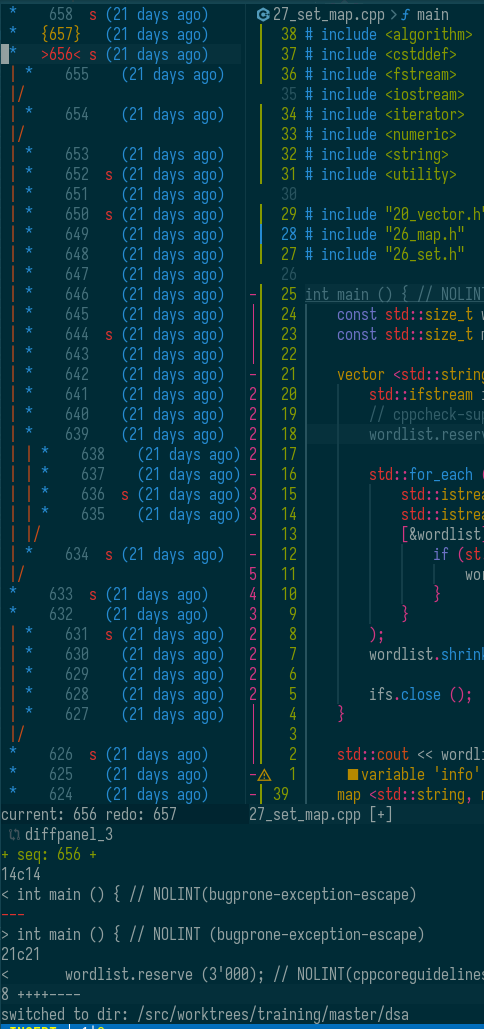 Have you ever found yourself in this situation: you delete a piece of code,
add something new, and then realize you want to bring back a small chunk
from what you deleted? You press Ctrl+Z until the deleted code appears,
copy it - and then accidentally press some key other than Ctrl+C. Now your
newest changes are gone. I suspect many IDE users run into this constantly.
Have you ever found yourself in this situation: you delete a piece of code,
add something new, and then realize you want to bring back a small chunk
from what you deleted? You press Ctrl+Z until the deleted code appears,
copy it - and then accidentally press some key other than Ctrl+C. Now your
newest changes are gone. I suspect many IDE users run into this constantly.
This happens because, in most IDEs, the undo buffer is effectively linear. Or perhaps the UX is so poor that even when the undo history is a tree, most developers never discover it or learn how to navigate it.
In a true undo-tree model, undoing changes and then making a new edit doesn’t overwrite history. Instead, it creates a new branch in the tree. You can then navigate this tree and recover your code from any state it ever passed through during editing.
Combine this with persistent undo buffers - where closing a file, restarting the IDE, or even overwriting the file with an external tool doesn’t destroy your undo history - and once you get used to it, coding without this feature feels like zipping your code and uploading it to Drive instead of using Git.
Now consider this: what happens when you close a file in your IDE, or close the entire IDE, and then reopen it? Usually, the file opens at the beginning. In Vim or Neovim, with just three lines of configuration, the file reopens at the exact cursor position where you left off. You can even restore the entire layout of tabs and windows.
This is why Vim and Neovim are better - not simply because they have an undo tree built in, but because almost every Vim user knows about powerful features like these and actually uses them. I’d bet that very few “regular” IDE users use comparable features, or even know they exist - or ever imagined that editing could work this way.
Vim and Neovim aren’t black boxes from the ’80s. They support LSPs (thanks, Microsoft 😄), DAP, TreeSitter based syntax-aware highlighting and textobjects, excellent AI integration, and all the classic Vim advantages: marks, registers (clipboards on steroids), macros, and more.
You have to try it. If you think you don’t have time to learn Vim, the truth is you don’t have time not to. Vim saves an enormous amount of time - and makes coding a better and more fun process.