Using NeoVim Is an Awesome Experience
There are a lot of plugins covering almost anything you’ll need in your development environment.
When there’s no plugin solving your problem, you can manually do it. It’s easy!
For example I wanted IWYU integration in NeoVim and didn’t found any plugins for it. This is how I integrated IWYU in my NeoVim config, and these are the mappings.
I was using a theme plugin which didn’t working with some plugins I was using, on some places didn’t working the way I wanted. I’ve customized the plugin manually and now it works as I like.
The repo was inactive and had a good PR… No problem! I merged the PR directly into my fork.
Sometimes you don’t even need to code anything to solve your problem. I’m using a plugin to manage treesitters. Seems it doesn’t have an “update all” feature and I wanted to update all installed treesitters. In its UI in front of every installed treesitter it shows ✅ and it have “u” mapping to update the “selected” treesitter. To “select” a treesitter you just navigate to its line.
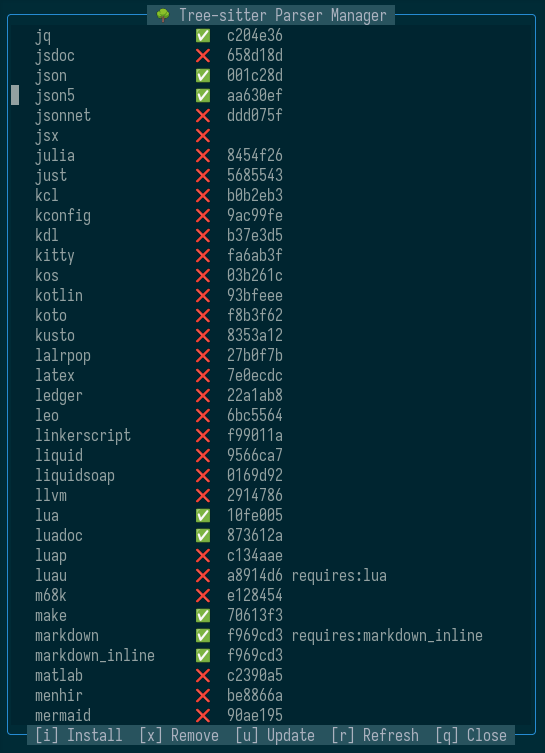
This is what I’ve did: moved the cursor to a ✅ symbol, pressed * and executed this command: :%g//norm u And it updated all of the installed treesitters.
How it worked? Explore the magic yourself 🙂
I use NeoVim primarily for C/C++ development and it have everything I need. And there are NeoVim integrations for almost anything!!
- Unity: neovim-unity, nvim-unity.
- Unreal Engine: Unreal.nvim, UnrealDev.nvim.
- Java: nvim-java, nvim-jdtls.
- Android: android-nvim.
- Apple ecosystem: xcodebuild.nvim
- Dot Net: easy-dotnet.nvim.
- CMake: cmake-tools.nvim, universal compiler: compiler.nvim.
- Unit tests: neotest
- AI: avante.nvim
- …